




















Key Takeaways
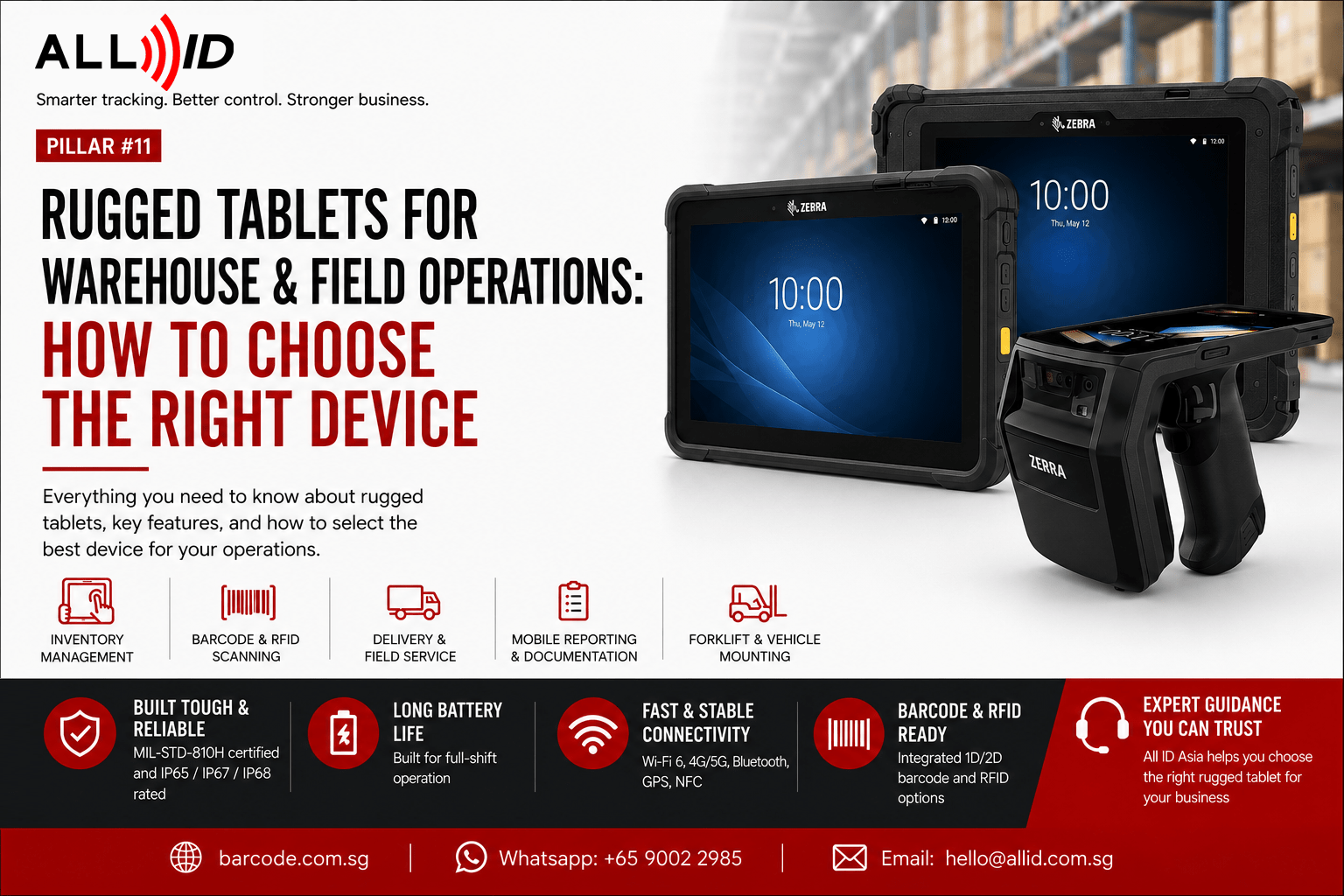
- Rugged tablets are designed for demanding warehouse and field environments where devices may be exposed to drops, dust, moisture, vibration and temperature changes.
- Depending on the model, rugged tablets may offer MIL-STD-810H testing and IP65, IP67 or IP68 protection.
- Integrated or optional barcode scanners can support receiving, stock checks, picking, asset tracking and proof-of-delivery workflows.
- Important selection factors include battery runtime, screen visibility, operating system, connectivity, mounting options and compatibility with business software.
- Rugged Android tablets are commonly used for mobile warehouse and field applications, while Windows models may be more suitable for legacy desktop or ERP systems.
- The correct device should be selected according to the working environment and operational workflow, rather than price alone.
Introduction
Warehouse and field teams operate in environments that quickly damage consumer electronics: drops onto concrete, freezer zones, dust-filled docks, and constant forklift vibration. When real-time data access is critical for inventory management and shipping verification, the hardware choice is as important as the software. Rugged tablets deliver reliable performance in these tough conditions, reducing downtime from broken screens or dead batteries.
This guide explains what makes rugged tablets different from standard consumer devices, where they are used, and which specifications matter when selecting one for business operations. Whether you require rugged tablets for warehouse operations, logistics, field service or manufacturing, choosing the right device can improve productivity, data accuracy and equipment reliability.
What Is a Rugged Tablet?
Unlike consumer tablets, rugged tablets have reinforced magnesium or polycarbonate chassis, sealed ports, shock-absorbing mounts, and optically bonded Gorilla Glass or similar hardened displays.
Key differentiators include:
- Impact resistance – many models can withstand drops from 1.2 meters onto concrete, verified by standard tests and detailed on the spec sheet.
- Ingress protection – IP65, IP67, or IP68 ratings ensure dust-tight and water-resistant design; IP69K protects against high-pressure washdowns.
- Environmental endurance – some industrial rugged tablets operate from -20°C to 50°C (-4°F to 122°F), handling everything from freezer storage to sun-exposed loading docks.
- Vibration and shock resistance – vital for forklift and vehicle mounting in hostile environments. Most industrial grade rugged tablets come with, sine: 4 g’s PK(5 Hz to 2 kHz) random: 6 g RMS (20 Hz to 2 kHz)
Rugged tablets often meet internationally accepted industrial standards such as MIL-STD-810H, which includes testing for thermal shock, humidity, altitude, and repeated drops. The IP65 rating indicates mechanical protection from dust, low pressure water jets from any angle and external damage resistance. However, products with IP65 ratings are highly water resistant but not completely waterproof. These certifications are verifiable and not just marketing claims.
Why Rugged Tablets Are Used in Warehouse & Field Operations
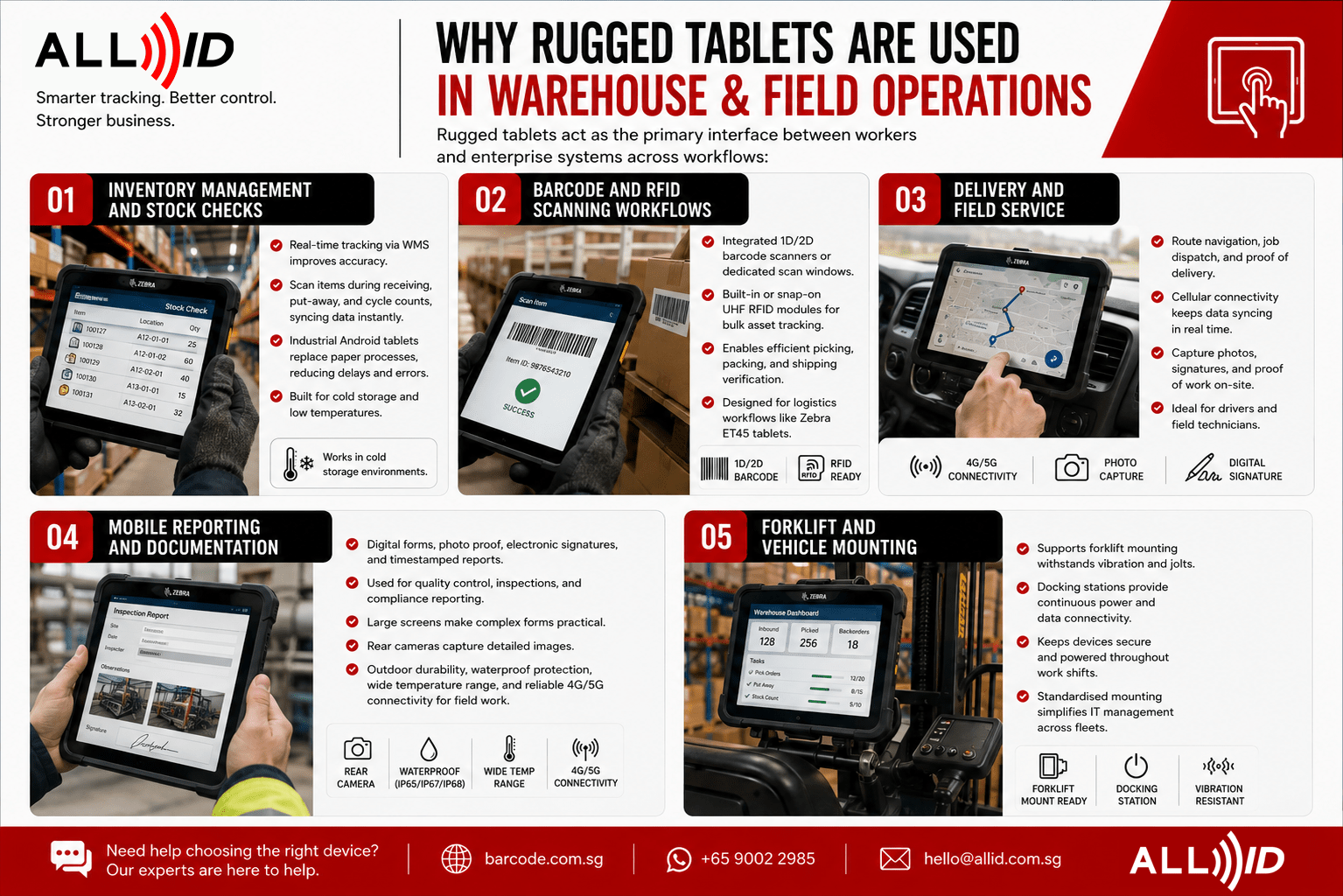
Rugged tablets act as the primary interface between workers and enterprise systems across workflows:
Inventory Management and Stock Checks
Real-time tracking via warehouse management systems (WMS) on rugged tablets improves accuracy. Workers scan items during receiving, put-away, and cycle counts, syncing data instantly. Industrial Android tablets replace paper processes, reducing delays and errors.
In cold storage, where consumer devices fail due to condensation and battery drain, rugged tablets rated for low temperatures continue working reliably.
Barcode and RFID Scanning Workflows
Many rugged tablets include integrated 1D/2D barcode scanners or dedicated scan windows, eliminating separate devices. For bulk asset tracking, built-in or snap-on UHF RFID reader modules enable efficient picking, packing, and shipping verification. Zebra ET45 industrial tablets are designed specifically for these logistics workflows.
Delivery and Field Service
Drivers and field technicians rely on rugged tablets for route navigation, job dispatch, proof of delivery, and on-site work orders. Cellular connectivity keeps data syncing between vehicles, customer sites, and back-office systems, while cameras and signature capture provide verifiable proof of work.
Mobile Reporting and Documentation
Digital forms, photo proof of delivery, electronic signatures, and timestamped inspection reports run natively on rugged tablets. Field teams use them for quality control and compliance reporting. Larger screens make complex forms practical, and rear cameras capture detailed images of damage or installations. A field service tablet should offer outdoor durability, waterproof protection, a wide operating temperature range, and reliable 4G/5G connectivity.
Forklift and Vehicle Mounting
Rugged tablets support forklift mounting, remaining powered and responsive amid vibration and jolts. Docking stations provide continuous power and data connectivity, so devices stay in place during shifts. Standardised mounting hardware simplifies IT management across fleets.
Rugged Tablet vs Standard Tablet
| Feature | Rugged Tablet | Standard Tablet |
| Durability Testing | MIL-STD-810H certified; drop-tested from 4 ft. / 1.2 m to concrete *With optional rugged frame: 5.1 ft. / 1.55 m | Minimal drop protection; usually no certification |
| Battery Life | Ample power for a full shift; continuous operation is enabled with the secondary optional battery | Limited power, often require regular recharging |
| Connectivity | Wi-Fi 6, 4G/5G cellular, Bluetooth, GPS, NFC | Wi-Fi, limited cellular options, exposed ports |
| Environmental Resistance | IP65; operates in humidity, dust, freezer, and washdown conditions. While highly water resistant, not fully waterproof. | Limited to room temperature, dry environments. |
| Security | Enhanced security with enterprise class OS security feature | Standard consumer-grade security |
| Total Cost of Ownership (TCO) | Designed to last up to 6 years | Designed to last 1-2 years |
| Rugged tablets cost more upfront but reduce total ownership costs by lowering repairs and downtime. |
When to use standard tablets: Light environments like climate-controlled retail or occasional tagging where drops and exposure are unlikely.
Key Features to Look For in a Rugged Tablet
Screen Visibility and Touch Performance
Look for bright displays (500+ nits) with anti-glare coatings and optical bonding for outdoor use. High brightness screens improve visibility in sunlight. Glove- and wet-touch compatibility (capacitive multi touch) is essential so workers don’t remove PPE. Hardened glass, such as Corning Gorilla Glass or built-in screen protectors prevent scratches. Stylus or pen input helps with annotations and signatures.
Battery Life and Power Management
Look for a battery rated to last a full 8–10 hour shift under real workload, not just standby. User-replaceable or hot-swappable batteries let teams swap power packs without shutting down the device — essential for multi-shift operations. For forklift-mounted units, powered docks keep tablets charged throughout the day.
Connectivity and Integration
Wi-Fi 6 and 5G enable real-time data access. Dual-band Wi-Fi with seamless roaming prevents dropouts in large warehouses. Cellular 4G/5G with a nano SIM offers backup outdoors. Bluetooth connects peripherals like scanners and printers. Rugged tablets integrate with WMS and support enterprise mobile device management.
Durability Ratings and Protection
Choose IP65 or higher for dust and water resistance; IP69K is needed for washdown environments. Verify MIL-STD certifications and drop-test details. Some models handle drops from over 1.2 meters and operate in extreme temperatures. Vibration resistance is critical for vehicle mounting.
Operating System and Software Compatibility
Android dominates lightweight WMS and mobile apps; Windows suits legacy ERP and desktop applications. Ensure long-term OS updates and hardware SDKs for scanning and connectivity. Some rugged tablets also support modular accessories like snap-on scanners and vehicle docks. A rugged Android tablet is ideal for businesses using Android-based warehouse management, inventory, and field service applications.
Which Rugged Tablet Is Best for Different Business Types?
Warehouse and Distribution Centers
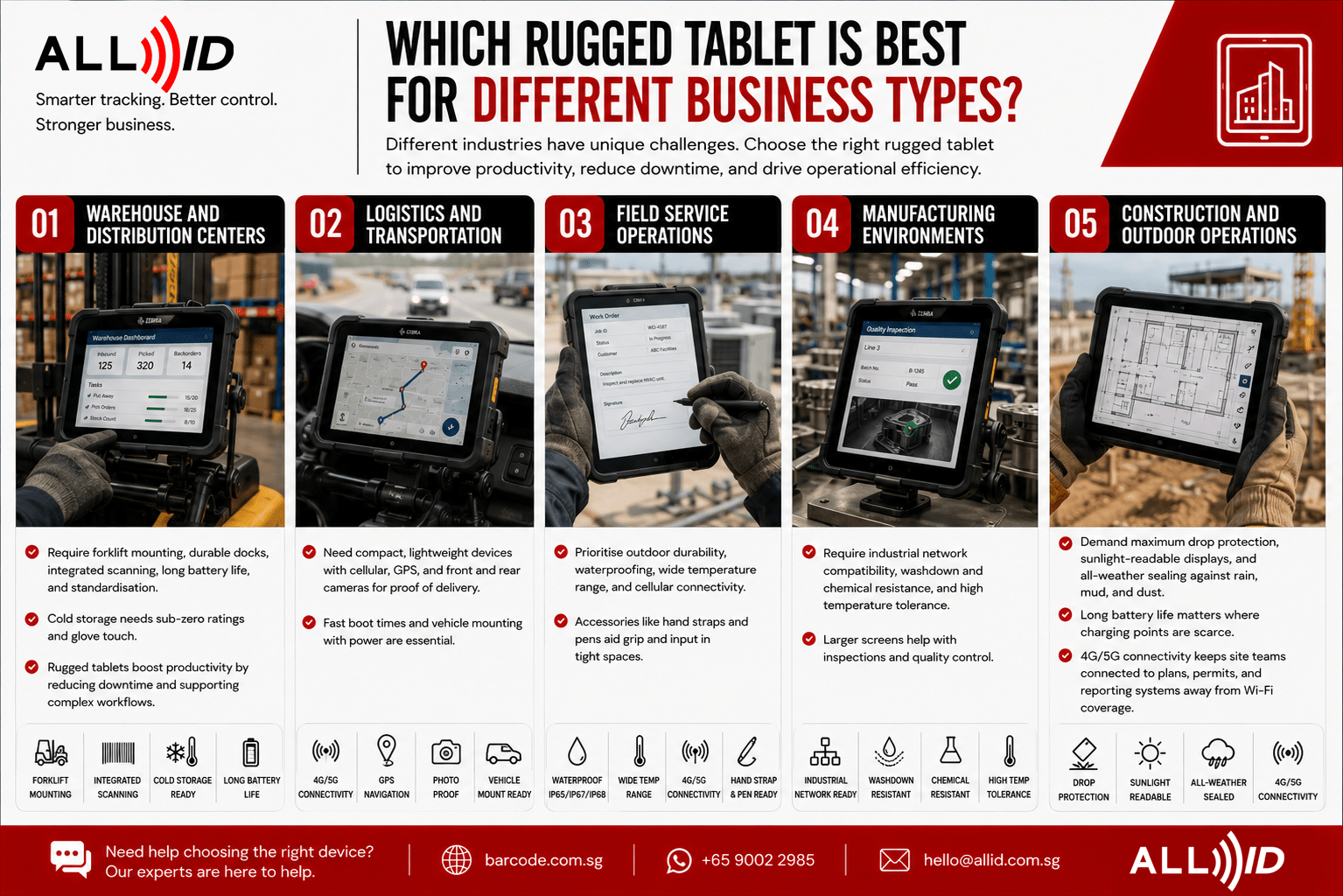
Require forklift mounting, durable docks, integrated scanning, long battery life, and standardisation. Cold storage needs sub-zero ratings and glove touch. Rugged tablets boost productivity by reducing downtime and supporting complex workflows.
Logistics and Transportation
Need compact, lightweight devices with cellular, GPS, and front and rear cameras for proof of delivery. Fast boot times and vehicle mounting with power are essential.
Field Service Operations
Prioritise outdoor durability, waterproofing, wide temperature range, and cellular connectivity. Accessories like hand straps and pens aid grip and input in tight spaces.
Manufacturing Environments
Require industrial network compatibility, washdown and chemical resistance, and high temperature tolerance. Larger screens help with inspections and quality control.
Construction and Outdoor Operations
Demand maximum drop protection, sunlight-readable displays, and all-weather sealing against rain, mud, and dust. Long battery life matters where charging points are scarce, and 4G/5G connectivity keeps site teams connected to plans, permits, and reporting systems away from Wi-Fi coverage.
When Should You Use a Rugged Tablet Instead of a Handheld Device?
Rugged tablets excel in workflows needing complex forms, multi-app use, maps, photo/video documentation, and signature capture. Larger screens improve visibility and efficiency.
Handheld devices and phones are better for high-volume scanning requiring one-hand use and maximum mobility, such as walking between racks or climbing ladders.
Many operations use both: rugged tablets mounted on forklifts or benches, with handheld scanners for workers on foot. Some tablets accept snap-on scanner modules to combine form factors.
Browse Rugged Tablets for Business Use
All ID Asia offers a full range of rugged tablets tailored for warehouse, logistics, and field operations across Singapore and ASEAN, including models like the Zebra ET45 Industrial Tablet. Browse rugged tablet models to compare specifications and configurations.
We provide solution design assistance, accessory configuration, WMS/ERP integration, and after-sales support with spare parts. Contact our team for personalised consultation.
Common Mistakes to Avoid
- Choosing based on price alone – low-cost consumer or budget rugged-labelled tablets often fail in real warehouse conditions; verified IP ratings (IP65 or higher) and genuine MIL-STD-810H certification matter. .
- Ignoring environmental needs – using standard-temperature tablets in freezers and areas needing IP65 devices can lead to failure.
- Overlooking battery/runtime – marketing claims may not reflect real user cases. Always consult an expert.
- Selecting wrong screen size – bulky large tablets hinder handheld use; screens that are too small frustrate complex WMS navigation; match size to workflow.
- Poor connectivity planning – steel racking often causes Wi-Fi dead zones; without cellular backup or offline sync, workers lose critical data access.
Frequently Asked Questions
What is a rugged tablet and how does it differ from regular tablets?
A rugged tablet has reinforced construction—sealed ports, shock-absorbing internals, hardened displays—built to meet MIL-STD-810H durability standards and IP65 or higher ingress protection. Unlike regular tablets, they withstand drops, dust, moisture, and temperature extremes, lasting 4–6 years in harsh environments where consumer devices fail in months.
Are rugged tablets necessary for warehouse operations?
Yes. If your devices are regularly exposed to drops, dust, moisture, extreme temperatures, or vibration, rugged tablets provide greater durability than standard consumer devices. Their robust design helps minimise damage, reduce downtime, and lower long-term repair and replacement costs.
Can rugged tablets be used for barcode scanning?
Yes. Many have integrated 1D/2D barcode scanners optimized for speed and accuracy. Others connect to Bluetooth scanners or snap-on modules. Many also include RFID readers for asset tracking.
What features should you look for in rugged tablets for field work applications?
Look for sunlight-readable displays (500+ nits), IP65 or higher protection, MIL-STD-810H certification , and cellular 4G/5G connectivity. Brands like Zebra offer outdoor-optimized models with durable design.
How long do rugged tablet batteries typically last?
Most enterprise rugged tablets are designed to run a full 8–10 hour shift on a single charge, with many supporting hot-swappable or extended batteries for multi-shift operations. Real-world runtime varies with screen brightness, scanning frequency, connectivity use, and temperature — cold storage in particular drains batteries faster, so factor your environment into the decision.
What connectivity options are available for rugged tablets?
Modern rugged tablets support Wi-Fi 6, 4G/5G with nano/dual SIM , Bluetooth 5.x, GPS/GNSS, and sealed USB C ports. Enterprise models offer seamless Wi-Fi roaming, offline sync, and mobile device management.
Conclusion
Choosing the right rugged tablet means matching device durability, battery, connectivity, and software compatibility to your environment and workflows. Prioritise verified certifications, plan for accessories and mounting, and standardise devices to reduce IT complexity.
Explore All ID Asia’s industrial tablets suited for warehouse, logistics, and field service needs. Contact our team for expert guidance tailored to your operation.
